Peak Games, Tiny Budget
How a Green Bald Dude Ships on RUN: Building 18 Games in 30 Days with $0 and a Stubborn Refusal to Ship Anything Ugly.
By Saizuo · October 27, 2026
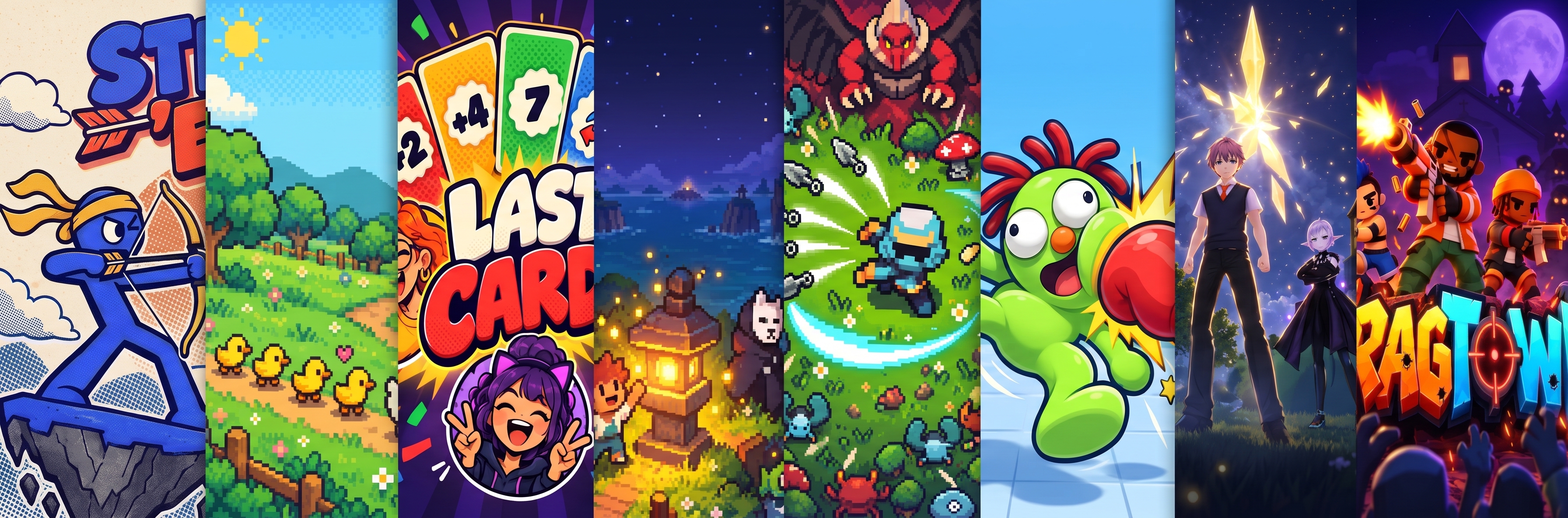
Hi. I'm SAIZUO, but on the RUN Discord you probably know me as Green Bald Dude. Yes, the green guy. No, I won't explain the green.
I've been on RUN for exactly one month. In that month I've published 18 public games and built more than 40 prototypes that live in a folder called unused. They sit there like puppies at a shelter, waiting for someone to give them a home. Some of them will see daylight one day. Some of them deserve to stay in there forever. We don't talk about those.
My top game, Monster Conga, sits at 500+ plays, which in my head is basically GTA numbers.
Play everything that made it out alive here: run.world/Saizuo
So when RUN asked me to write about making great games on a budget, my first thought was: "Budget? Brother, I AM the budget." No art team, no composer, no money for asset stores. Just research, free tools, a lot of AI chats and a stubborn refusal to ship anything ugly.
Here's the whole process, step by step:
Research like a detective before touching anything.
Argue with an AI until the idea stops being mid.
Plan every screen, menus included.
Write prompts so good that a cheaper model can build them.
Get assets for $0.
Make it run on a potato: preloader, benchmark, graphics settings.
Build in Studio or the CLI, and spend credits like they're your last slice of pizza.
The one-line version: every credit you save comes from thinking before you build. Thinking is free. Rebuilding is not.
Step 1: Research like a detective (costs: 0 credits)
Before I open Studio I answer three questions. This is free, and it decides whether anyone will ever click your game.
What's already out there? Scroll the jam entries, the trending page and Editor's Picks. Write down what's crowded. If you see 14 survivors-likes, congrats: you just found the genre not to make.
What's missing? When a theme drops, everyone makes the first idea that pops into their head. During the October jam, the list was wall-to-wall survivors-likes, tower defence and monster tycoons. My trick: write down the 5 most obvious ideas for the theme, then cross them all out. Whatever you come up with after that is where the good stuff lives.
What does the reference actually look like? Not what you remember it looks like. Pull up real screenshots and note the character style, UI layout and colours. Vague brain = vague prompt = five bad generations = sad wallet.
Rule of thumb: if you can't pitch the hook in one sentence, it's not an idea yet, it's a vibe.
Step 2: Argue with an AI (still 0 credits)
Next I take my notes to an AI chat and start a fight. If I have a paid assistant at the time, great. If not, free ChatGPT is plenty. You do not need a subscription to brainstorm. You need a sparring partner who doesn't get tired of you.
What I ask for:
3 to 4 named design concepts, never one. Each one gets a look, a palette, a font pair and a one-line mechanic. Picking beats polishing the first idea for three days.
Roast my idea. "What gets boring after 5 minutes?" "Why would anyone open this tomorrow?" If the AI is too nice, tell it to be meaner.
The comeback loop. Daily gift, streak, leaderboard, something worth sharing.
I kill a lot of ideas here, and that's the point. I binned a monster band music toy because a dancing-monster game already existed. That's also how the unused folder got to 40+: some of those died in chat, the rest died after I built them. Learn from me. Killing an idea in chat is free. Killing it after a week of building costs a week.
Step 3: Plan every screen, yes, even the menu
Everyone plans the gameplay. Nobody plans the menu. Then the menu is a grey box with "PLAY" in Arial, and players leave before the game even loads its personality. The menu is your shop window. Plan it.
My checklist, before a single build prompt exists:
Boot and title: splash, key art, ideally a live demo running behind the menu.
Core loop: what you do every 10 seconds, every minute, every session.
Progression: levels, chapters, unlocks, a shop with a soft currency.
Comeback hooks: daily gift, streak, daily seed, leaderboard modes.
RUN features: cloud save, leaderboards, rewarded ads, Bits items, notifications.
Settings and credits: volume, controls, special thanks.
Then lock the scope. Write down exactly how many levels, worlds and enemies you're making, and don't budge. Fixed scope, fixed cost. "I'll just add one more feature" is how 10k credits turns into 30k.
And the rule I learned the hard way: plan for updates on day one. Keep save, ads, leaderboards and shop in their own small files. Then every update can rip out gameplay without ever touching the save file, and nobody loses their progress (or their mind).
Step 4: Write prompts so good a cheaper model can build them
This is where budgets go to live or die. "Make a zombie shooter" is not a prompt, it's a lottery ticket. The AI guesses, you rebuild, it guesses again, and your credits quietly pack their bags.
How I write build prompts:
Split it into parts. One giant message gets cut off or half-followed. I break a game into 3 to 5 parts (core game, art and UI, menus and shop, RUN features) and send them one at a time.
Be annoyingly specific. Exact numbers for speeds, costs, timers. Exact names for screens and buttons. Exact colours and fonts from Step 2. If a human designer would need to ask you a question, the AI will just guess instead.
End every part with a check. "Confirm every file in this part is in place and the build passes before I send the next one." Bugs are cheap in part 1 and expensive in part 5.
Updates get their own prompt. List only what changes, and always say what not to touch. "Do not touch the save file" has saved more of my players than any feature.
Different models for different jobs:
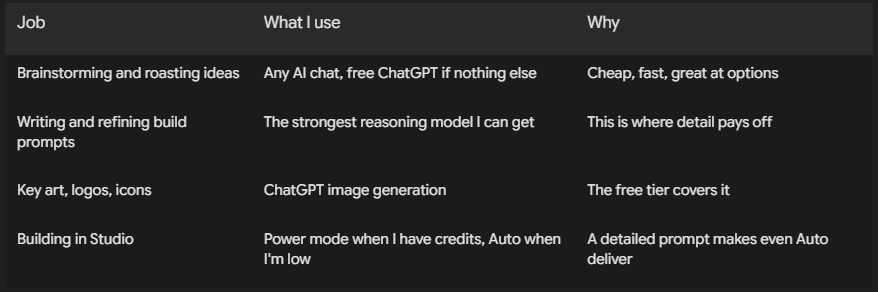
That last row is the whole trick: do the expensive thinking where it's free, so the building can be cheap.
Step 5: Assets for $0 (I have never paid for one)
I pick ONE route per game. Mixing a cute pixel duck with a realistic 3D zombie is how you get a game that looks like a ransom note.
Route A: use what's already out there. Let's kill a myth: you don't get bonus points for making every tree yourself. If you're not an artist (hi, me), free asset packs are the biggest time-saver in game dev. Your job is to make a fun game, not to prove you can model a barrel.
Kenney is my #1 recommendation. Kenney has tens of thousands of free game assets: 2D sprites, 3D models, UI kits, fonts, sound effects and music. Why I love it:
It's CC0, which means public domain. Use it in commercial games, no credit required (though crediting Kenney is a nice move). Source
It's fast. Low-poly models and small files load quickly, which matters a lot for web games on phones (see Step 6). Monster Conga is built entirely on Kenney's Graveyard Kit.
Everything matches. One consistent style across packs, so a graveyard, a city and a UI kit look like they belong in the same game.
Some character packs come with animations, like idle, run and jump. For anything fancier (shooting, attacks, dancing), you'll either combine packs or animate in code, which is what I did for the conga dancers.
Other free sources I use or recommend:
Quaternius: CC0 3D characters, zombies and animation libraries. FRAGTOWN runs on these.
itch.io: tons of free packs. Ninja Adventure (LANTERN ISLES) and Tiny Swords (TINY WAR) came from here.
OpenGameArt: huge library, but licences vary per asset.
Google Fonts: free fonts for titles and UI.
Read the licence. Every. Single. Time. "Free to download" doesn't always mean "free to use in your game". CC0 means do anything. CC-BY means you must credit the creator. Some packs ban reselling or commercial use. Two minutes of reading saves you from your game getting taken down.
And only ship the files you actually use, compressed. Your players are on phones with one bar of signal on a bus.
Route B: AI art, one image at a time. For key art, logos, covers and icons I use ChatGPT's image generation. One prompt, one image, then check it: transparent background? same style as the last one? facing the right way? Then the next prompt. Ask for 20 at once and you get 20 cousins who've never met. Always attach a screenshot of your actual game as the style reference, or the AI will "improve" it into an oil painting.
Route C: draw the art in code. WADDLE HOME, Drizzle and a bunch of my prototypes have zero image files. Every sprite, background and button is drawn by code. Free, sharp on any screen, and nobody else on the platform has your look. Same for sound: synthesised music and effects instead of downloads.
Honesty corner: AI art is not always the answer. A generated key art for FRAGTOWN looked nothing like our 3D models, so I binned it and made the menu a live 3D scene of the actual game. Looked better, cost nothing.
Step 6: Make it run on a potato
Hard truth: your phone is not their phone. You test on your device, with the game open in one tab and the charger plugged in. Your player has a three-year-old phone, battery saver on, 40 tabs open and one bar of signal on a bus. If it stutters for them, it's broken. It doesn't matter that it's buttery on yours. They won't leave a comment. They'll just leave.
So every game I ship has this flow: preloader → menu → game. Here's why each part matters.
1. A preloader that shows up instantly
It has to appear in under a second. Tiny file, no big images, no 3D. Just your logo, a progress bar and maybe a little animation. A black screen for 4 seconds looks like a crash, and people close crashes.
Show real progress. A bar that sits at 99% forever is a lie, and players can smell it.
Make it feel like your game. Your colours, your font, a silly loading tip. It's the first thing anyone sees, so it's part of the game.
2. Download assets before you need them
Load up front, behind the preloader. Nothing kills the vibe like a boss fight where the boss shows up 3 seconds late and textureless.
Load in order of need. Menu stuff first, so the menu opens fast. Then load the rest in the background while the player is choosing a skin.
Compress everything. Smaller images, compressed models, short audio. Every megabyte you cut is a player who didn't give up waiting.
3. A 5-second benchmark (this one is huge)
In the first ~5 seconds, while the preloader or the menu's live background is running, measure how smooth the game actually is on that device. If the frame rate is low, drop the quality automatically: lower resolution, fewer particles, no shadows, no bloom. Save the result so it doesn't re-run every launch.
FRAGTOWN is my example. It has a pretty mode (bloom, shadows) and a fast mode, and it scales its resolution down on the fly when the frame rate drops. The player doesn't have to dig through settings. The game just works on their phone.
You can ask Studio for this in plain words: "For the first 5 seconds, measure the frame rate. If it's under 50 fps, switch to low graphics (lower resolution, no shadows, half the particles) and save that choice."
4. Ask people what they want, and let them change it
On first launch, offer a simple choice: "Pretty" or "Smooth", with the benchmark's pick already selected. People like being asked, and some will trade looks for battery life.
Always have a graphics setting. Low, Medium, High at minimum, reachable from the menu and the pause screen. No graphics setting means someone with an old phone has no way to fix it, so they leave.
Ask your community. I post screenshots and test builds on the RUN Discord and ask what looks better or runs better on their phones. Free feedback from devices you'll never own.
5. Buttons that feel good to press
Big enough for a thumb. If you need to zoom in to hit it, it's too small.
Every press reacts. A sound, a squish, a colour change. A button that does nothing visible feels broken even when it works.
Stay out of the corners. Notches and home bars eat corners. Keep important buttons inside the safe area.
Same job, same look. If "Play" is a big green button, every main action is a big green button.
6. Basic design style (you don't need a design degree)
3 to 5 colours, max. Pick a palette in Step 2 and stick to it everywhere, menus included.
2 fonts, max. One fun font for titles, one readable font for everything else.
One style for everything. Same corner roundness, same icon style, same outline thickness. Consistency is what makes cheap look expensive.
Less text, more icons. Nobody reads tutorials. Show, don't tell.
Contrast. If you squint and can't find the Play button, nobody else can either.
Step 7: Studio or CLI? (Both. Next question.)
I started in Studio, and these days I'm on the CLI more and more. Both are great. Here's how I pick.
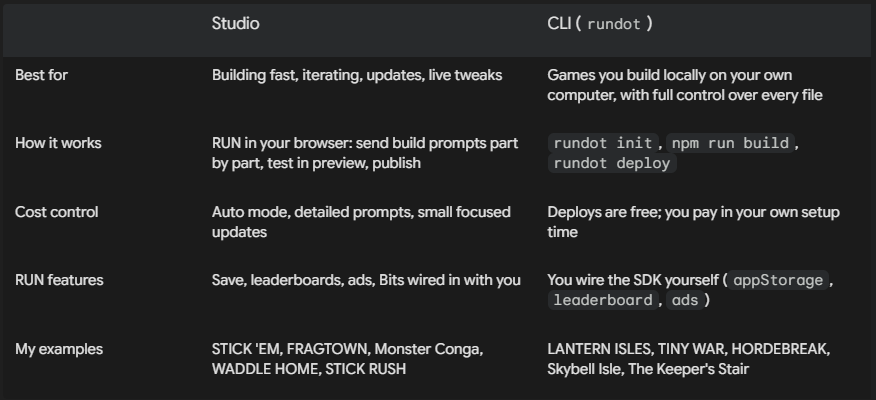
Where Studio shines: Studio is RUN in your browser, and it's the best place to start. No setup, you see every file, and you can ask for one precise change while the rest stays untouched. Even 3D works: Monster Conga runs on Kenney 3D models packed right into the code, and it was built and updated more than 25 times entirely in Studio. FRAGTOWN went through around twenty versions the same way, each one a small, boring, beautiful prompt like "fix the wall glitch in wave 6, don't touch anything else." Bug report on Discord in the morning, live fix by evening.
Why I'm on the CLI more now: the CLI is RUN on your own computer. You build locally in your own editor, test it in your own browser as many times as you want, then rundot deploy sends it up. Full control over every file, no size headaches with big asset folders (models, textures, music), and your local testing doesn't cost anything. My newer and bigger games went this way: LANTERN ISLES, TINY WAR, HORDEBREAK, Skybell Isle and The Keeper's Stair.
My honest advice: start in Studio, graduate to the CLI once your games get bigger or you want more control.
Auto mode vs Power mode: know your weapon
Power mode is my default, when I've got the credits. It's the big brain: better at tricky bugs, big systems, and changes that touch ten files at once. Auto mode is what I switch to when I'm running low. And honestly, if your prompt is detailed (Step 4), Auto gets you surprisingly far. On a tight budget like 10k credits, Auto should be your daily driver.
But Power is a flamethrower. It burns credits fast, and it's confident. It will happily "improve" things you didn't ask it to touch. So when Power is on:
Tell it exactly what's in scope and what's off limits. "Only change the enemy spawner. Do not touch save, ads, shop or UI."
Check its work like it's a new intern on day one. Read what it says it changed. Does that match what you asked? Anything extra is a red flag.
Test immediately. Play the game right after, especially the parts it claims it didn't touch. Menus, save, shop.
Watch your credit balance. If it's getting low, drop to Auto for the small stuff. Don't use a flamethrower to light a candle.
How to build a peak game with ~10k credits
Here's how I'd split a 10k budget. These are percentages, not a law of physics, but the shape matters more than the exact numbers.
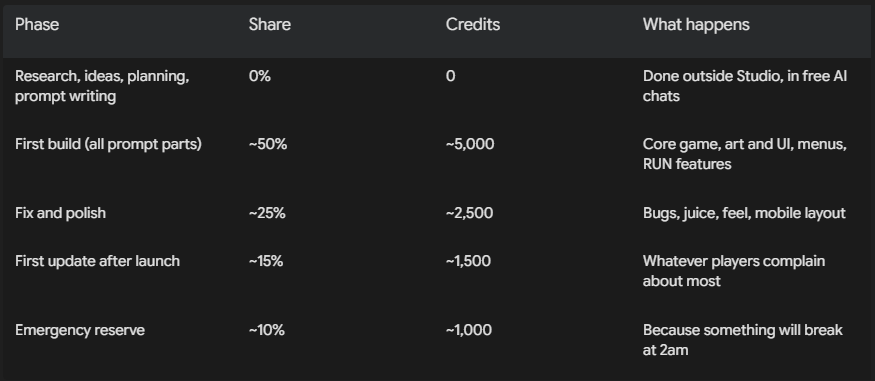
The rules that make this work:
Never "figure it out" inside Studio. Every "hmm, what if…" message is credits spent on thinking you could've done for free.
One change per message. Five changes in one message means if one goes wrong, you pay to untangle all five.
On 10k, use Auto by default and Power only for one specific hard problem, then back to Auto.
Test after every part. Catching a broken menu in part 2 costs one message. Catching it after part 5 costs a sad afternoon.
Don't polish what you haven't played. Play it on your phone first. Half of what you planned to polish won't matter, and something you never noticed will.
The peak-quality checklist
Budget is no excuse for jank. Before I publish, every game has to pass this:
☐ Preloader appears in under a second, with real progress.
☐ No assets pop in mid-game: everything important is loaded first.
☐ Runs smooth on an old phone, not just mine. The benchmark drops quality when needed.
☐ Graphics setting in the menu and the pause screen.
☐ Looks good on a phone and a PC, portrait and landscape.
☐ A first-time player understands it in 10 seconds without reading.
☐ Every button reacts: a sound, a squish, something. All of them big enough for a thumb.
☐ Save survives closing the app and coming back.
☐ There's a reason to come back tomorrow.
☐ The menu looks like it belongs to this game.
☐ I'd actually play it on the bus. Honest answer only.
Five Games, Five Lessons (and 40 ghosts in a folder)
STICK 'EM: ship small, then grow it. A ragdoll archery game that launched simple and then kept getting fed: body-part hit reactions, 10 unlockable arrows, armour tiers, a 60-stage Journey across 6 biomes, Endless mode, daily chests with a 7-day streak. Lesson: a small game that's live beats a masterpiece that's "almost done". Every update is a new reason to come back.
FRAGTOWN: your players are your QA team. A co-op zombie shooter in the Left 4 Dead style, built on free Quaternius models, now running a Halloween event. RUN Discord testers found a floating gun, invisible walls and a stuck rotation screen. Each one got a quick patch, and every tester is credited in-game under Special Thanks. Lesson: be nice to the people who find your bugs. They're doing your job for free.
MONSTER CONGA: launch is the starting line. Lead a conga line of monsters through a graveyard, waking the dead as you go. It got built fast, then updated more than 25 times: daily gifts, levels, perks, a Monster Maker, new leaders and hats. It's now my most-played game. Lesson: the first version is a draft that happens to be public. Keep feeding it, and put "[NEW UPDATE!]" in the title so people know.
LANTERN ISLES: free art can look expensive. An HD-2D monster-taming RPG with a tilt-shift camera, bloom, fireflies and day-night lighting, all on the free Ninja Adventure pack. Eight story chapters plus Warden Trials. Lesson: lighting and camera turn a free pixel pack into something people assume cost money.
WADDLE HOME: zero art files. A wholesome pixel-art duck game where every single pixel is drawn in code. No downloads, no generated images, no licences. Lesson: constraints force a style, and style is what people remember.
The rest of the public lineup: STICK RUSH, NIGHTCAP, Drizzle (you're a rain cloud, it's exactly as fun as it sounds), BROOKS FALLS, BOLT, Skybell Isle (an anime action alpha), SMACK BOB! (ragdoll smashing, very therapeutic), TINY WAR (a 40-level lane battler), LAST CARD!, KNOW IT ALL, NO HUMANS ALLOWED, The Keeper's Stair and HORDEBREAK. All of them at run.world/Saizuo.
And the 40+ prototypes in unused? They're not failures, they're tuition. A pigeon mail game with 30 routes, a Peggle-style graveyard game with an eyeball cannon, a dream puzzle drawn entirely in code. All finished-ish, all waiting. Every one taught me something that made the public games better. Some will come back. Some are cursed. I'll let you guess which.
The Receipt
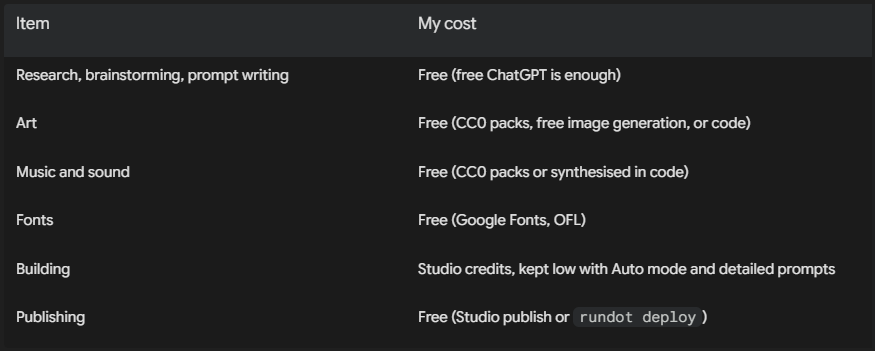
The only real spend is build credits, and this whole post is basically a guide to spending fewer of them.
Green Bald Dude's Top 10
Research the competition before you have an idea, not after.
Get 3 to 4 concepts from an AI and pick one. Don't marry the first idea.
Plan every screen. Yes, the menu. Especially the menu.
Lock your scope. "One more feature" is a trap.
Write prompts so detailed a cheap model can't mess them up.
Split big prompts into parts and check each one before the next.
Power when you can afford it, Auto when you can't. Either way, check what it touched.
Preloader, 5-second benchmark, graphics setting. Your phone is not their phone.
Keep save, ads and leaderboards in their own files so updates never wipe progress.
Ship early, update often, and credit the players who help you.
That's it. No money, just patience, a plan and a folder of 40 rejected children to keep you humble. If you're on the RUN Discord, come find the green bald guy and show me what you're building. I want to play it. Unless it's a survivors-like. Then I need to play it, so I can tell you to make something else.
(Yes, I made one too. It's called HORDEBREAK. Do as I say, not as I do.)
— Saizuo